

Bulletproof Business Apps: The Definitive Guide to Mobile Application Security
In today’s mobile-first world, your business applications have wandered far from the safety of the office desktop. They’re sitting on smartphones and tablets, travelling on the Tube, being used in coffee shops, and powering your critical operations wherever your team happens to be. It is fantastic for productivity, but let’s be honest—it’s a bit of a security headache. Recent data shows that 85% of mobile apps fail even the most basic security checks. That is a terrifying number when you consider how much we rely on these tools. Treating mobile security as a tech-only concern is a mistake; it is a fundamental business risk. If you ignore it, you’re looking at potential data breaches, hefty fines, and the kind of reputational damage that takes years to recover from.
Is your organization ready to build mobile solutions that drive productivity without compromising security? Contact our bespoke application development team today to establish a bulletproof architecture.
Key Takeaways
- Mobile security requires a proactive approach that starts at the design phase rather than being bolted on at the end.
- Understanding the unique threats—like physical device theft, insecure public Wi-Fi, and OS fragmentation—is the first step toward better protection.
- Adopting the “Security Experience Equilibrium” helps balance the need for high-level security with the reality that users want a smooth, frictionless experience.
- Technical measures like secure data storage, robust encryption, and RASP (Runtime Application Self-Protection) are non-negotiable for modern enterprise apps.
- A holistic security program includes continuous testing, regular staff training, and a clear incident response plan.

The Mobile Reality Check
I’ve been working with .NET and Microsoft technologies for 15 years now. I remember when we thought just locking the server room door was enough. How times have changed. Mobile devices operate in a completely different world to the controlled environment of a desktop PC.
Think about it. A mobile device can be stolen in seconds, potentially handing over everything stored on it to someone with malicious intent. Then there is the issue of networks; your team is likely hopping between home Wi-Fi, dodgy public hotspots, and cellular data, all of which are playgrounds for man-in-the-middle attacks. Add to that the nightmare of OS fragmentation—managing security updates for a fleet of devices running different versions of iOS and Android—and it’s no wonder people get overwhelmed.
At Full Metal, we see these challenges every day when building bespoke mobile and business applications. It’s not just about stopping a hacker; it’s about managing the human element of BYOD (Bring Your Own Device) policies, where corporate data and personal cat photos live side-by-side on the same hardware.

Where Things Usually Go Wrong
When I look at the architecture of many business apps, a few classic vulnerabilities keep popping up. These aren’t just theoretical risks; they are the bread and butter of attackers:
- Insecure Data Storage: Sometimes developers get lazy and store credentials or sensitive local data in plain text. It’s the digital equivalent of leaving your house keys in the front door lock.
- Weak API Security: We often see backend APIs that are left wide open. If your app talks to a server, that connection is the most likely place for an attacker to break in.
- Code Tampering: Skilled attackers can decompile your app, strip out your proprietary logic, or inject their own malware before repackaging it.
- Lack of Proper Encryption: Transmitting data without robust TLS or failing to validate server certificates makes it incredibly easy for someone to intercept your communications.
If you want to get a grip on this, start by looking at the OWASP Mobile Top 10, which lists current mobile risks including insecure communication, insecure data storage, insufficient cryptography, and inadequate supply chain security. Use it as a checklist during your next planning session.
Designing for Security from the Start
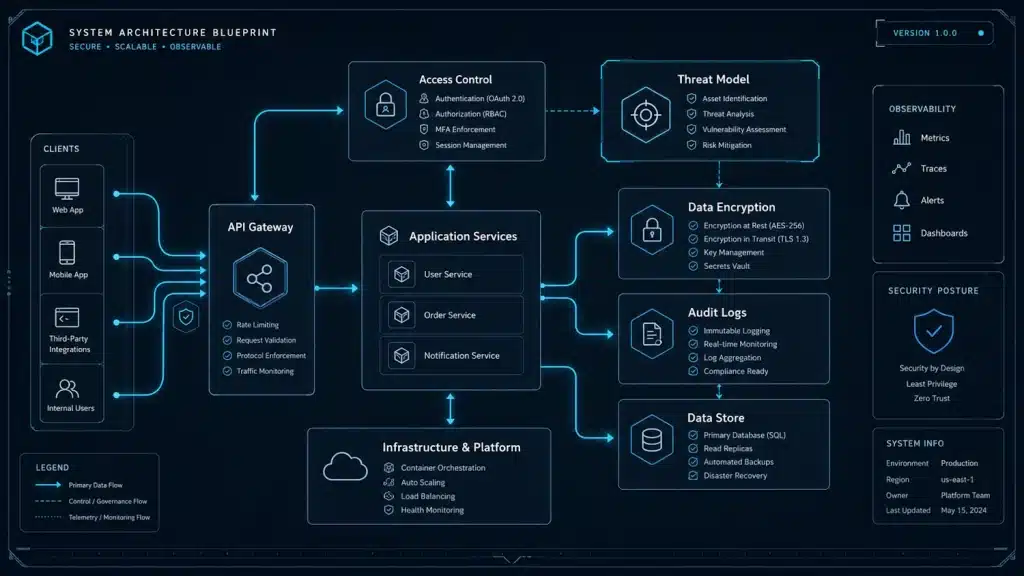
If you wait until the final stages of development to think about security, you’ve already lost. We call this “Security by Design”, and it fits naturally into a structured software development process. It means that every single person on your team—from the product owner to the junior dev—has security in mind from day one. This is also the direction recommended by NIST’s Secure Software Development Framework, which focuses on reducing vulnerabilities by building secure practices into the software development lifecycle.
Start with threat modelling as part of a clear software requirements specification. Use techniques like STRIDE to sit down and map out where your data flows and where the weak points are. It might sound like extra work, but trust me, refactoring a security flaw in a live app is far more expensive than catching it on a whiteboard.
Don’t wait until code flaws compromise your live systems, partner with Full Metal’s custom development specialists to engineer secure software solutions from the ground up.
Apply the principle of least privilege, too; Android’s own security guidance says apps should request only the minimum permissions necessary to function properly. Why should a basic reporting app have access to a user’s contacts or location? Only give components the permissions they absolutely need. And always, always encrypt your data at rest. If a device goes missing, you want to be sure that the data on it is unreadable. Use the platform’s secure enclaves—the iOS Keychain or the Android Keystore—to hold your secrets. Never store API keys in your source code; OWASP’s Secrets Management Cheat Sheet warns that hardcoded secrets in source code and configuration files are a common cause of leaks.
The Reality of Coding Securely
When we are knee-deep in code, it’s easy to focus solely on functionality. But secure coding is what keeps the lights on.
For instance, input validation is a massive one. Never, ever trust data coming from a user or an external API. Even if you validate input on the client-side for a better user experience, your server-side code must treat all incoming data as potentially toxic.
I’m a big fan of obfuscation. It’s not a silver bullet, but it raises the bar high enough that most casual hackers will move on to an easier target. Also, take a hard look at the third-party libraries you are importing. We often lean on SDKs to speed up development, but these are essentially black boxes. If you don’t vet the library or keep it updated, you are inheriting the security flaws of someone else’s code.
Runtime Protection and Monitoring
Once your app is out in the wild, the work isn’t done. You need eyes on the ground. This is where Runtime Application Self-Protection (RASP) comes into its own.
RASP is effectively a security guard living inside your app. It can detect if someone is trying to debug the app, if the device has been rooted or jailbroken, or if there is suspicious code injection happening in real-time. If it spots something dodgy, it can automatically log the user out or shut down the session.
Don’t forget about logging, either. You need to know what’s happening, but be careful what you log. Never, ever log sensitive data like passwords or full tokens. It’s a compliance disaster waiting to happen.

Finding the Security Experience Equilibrium
I hear this all the time: “If we add MFA (Multi-Factor Authentication), the users will hate it.” I get it. We want our apps to be fast, accessible, and easy to use, which is why security decisions should support the wider mobile app user experience. But the trick is finding that “Security Experience Equilibrium.”
Security shouldn’t be a binary choice between “locked down” and “open season.” It should be about context. If a user is on their office network, using their company-enforced device, maybe they don’t need to re-authenticate every five minutes. If they are trying to change their banking details from a new IP address in a different country, then by all means, challenge them with extra security.
Use biometrics where possible. It’s a massive win because it’s much harder for a user to forget their thumbprint than a password, and it feels far less intrusive than a clunky login screen.
Wrapping Up
Building secure mobile apps is a journey, not a destination. It requires a commitment to constant improvement, ongoing software maintenance and support, and a culture where your team feels empowered to raise a hand if they see a vulnerability. It’s about being proactive—testing often, monitoring continuously, and keeping your team trained.
At the end of the day, a secure app is a trusted app. When your customers and employees know you’ve done the work to keep their data safe, they’ll be much more likely to stick with you. Let’s keep building great things, but let’s make sure they are built to last.
Ready to secure your business future with custom mobile applications built to the highest enterprise standards? Get in touch with us today to turn your concept into a trusted, bulletproof reality.
Frequently Asked Questions
1. Is it really necessary to encrypt local storage if the device is already password-protected?
Absolutely. You shouldn’t rely on a single layer of protection. If a device is compromised, or if a user’s password is cracked, you need that second layer of encryption on your app’s data to prevent a total leak. It is about defense in depth.
2. How do I balance security with a great user experience?
The key is using the “Security Experience Equilibrium” framework. Focus on context-aware security. Instead of forcing every user to jump through every security hoop every time, use risk-based authentication to only trigger higher friction security measures—like MFA—when the context of the action demands it.
3. What is the most common mistake you see developers make with mobile security?
Relying on client-side validation as a security feature is a massive one. Another common pitfall is the misuse of platform-specific features, like not leveraging the iOS Keychain or Android Keystore correctly for sensitive data storage.
4. How often should we be performing penetration tests on our mobile apps?
Ideally, you should build security testing into your CI/CD pipeline so that automated tests happen with every build. Beyond that, a formal, manual penetration test should be conducted at least once a year, or whenever you make significant changes to the app’s architecture or authentication flow.
5. Why is it so important to detect rooted or jailbroken devices?
When a device is rooted or jailbroken, the standard security boundaries of the operating system are stripped away. This allows an attacker to bypass many of the built-in protections the app relies on. Detecting this state allows your app to restrict its own functionality to protect your data, which is a sensible precaution.
Further Reading
Read more in our Mobile Applications category of posts.


